Choose Which Site You Want To See



Flashback Express is a screen recording software tool that enables users to capture on-screen activity, system sound, and webcam footage for a range of personal or work-related tasks.
It offers recording modes suited to demonstrations, walkthroughs, or simple video capture, with an interface designed to be approachable for users with varying levels of experience. Its feature set may suit those who want a straightforward recorder without advanced editing needs, while still providing flexibility in how sessions are configured. It can also be useful for users who prefer a lightweight application focused primarily on recording rather than broader production functions. It may appeal to individuals seeking consistent performance for routine screen capture tasks across different setups.
Flashback Express is a screen recording program designed to help users capture on-screen activity with clarity and simplicity. It sits within the software tools category, with a specific focus on screen capture for personal, educational, and professional use. The brand has positioned itself as an accessible and user-friendly option for those who want essential recording features without the complexity or learning curve sometimes associated with more advanced video editing suites.
The software is part of a wider family of tools produced by its developer, which has a long-standing presence in the screen recording space. This helps define its place as a stable and recognised option for users who want a straightforward recording experience. While it does not aim to compete with high-end, production-focused applications, its appeal lies in offering core functionality that is suitable for demonstrations, tutorials, walkthroughs, and other forms of screen-based content creation.
Expectations around Flashback Express generally centre on practicality. Users typically look for reliable recording performance, the ability to capture screen, webcam, and sound, and a process that avoids unnecessary complexity. The software is known for being approachable for beginners while still providing enough flexibility for more confident users. It remains an entry-level to mid-market offering rather than a premium, feature-heavy tool, and it focuses on delivering an experience that feels stable, clear, and accessible for a wide audience.
Overall, the brand positions itself as a functional and dependable choice for those who want to record screen content without needing advanced editing tools or professional-grade production controls. This defines its value for individuals, educators, and small teams who require dependable screen capture with a focus on usability rather than specialist capabilities.
Browse the full range on the Flashback Express website.
Flashback Express is centred on screen capture. Users can record their entire display or select specific areas. This category includes the fundamental tools for creating tutorial videos, walkthroughs, or demonstrations. The emphasis remains on clarity and reliability rather than elaborate controls.
The program allows simultaneous webcam capture, making it suitable for presentations or commentary-based videos. The integration is designed to be simple, with options that help users combine screen content with personal introductions or explanations.
Users can record system audio, microphone input, or a combination of both. This flexibility supports voiceovers, explanations, or live commentary during recording sessions. The focus is on providing basic but practical audio options.
Flashback Express offers export settings that allow users to save recordings in common formats. These settings aim to balance ease of use with the needs of most general users. While not aimed at advanced video production, it provides enough control for standard output requirements.
The software includes scheduling tools, start and stop controls, and settings for defining the capture area. These features allow users to manage recordings in a way that suits their workflow, without extensive configuration.
Documentation and help resources are designed to support people who want to learn the basics quickly. This includes guidance that explains how to set up recordings and how to use the available features effectively.
Flashback Express operates with a clear focus on accessibility and user-friendly design. Its approach emphasises providing essential screen recording functionality without overwhelming users with advanced or specialised controls. This positions the brand within the mid-market and accessible software space, appealing to individuals and small teams who value simplicity.
The brand places attention on maintaining a workflow that is easy to understand, with menus and features organised in a way that feels familiar. Rather than competing with editing suites aimed at professional video creators, its role within the market is to offer a reliable and comfortable recording experience with a clear purpose.
Interacting with Flashback Express is typically shaped by a clean interface and a straightforward setup process. The layout keeps tools visible and easy to navigate, which can reduce uncertainty for new users. Many people find that screens, buttons, and options follow an intuitive structure, helping them begin recording quickly.
Information within the program prioritises clarity. Features are described in a way that helps users understand what they are choosing, and the overall experience feels geared toward simplicity. This contributes to the programme’s appeal for those who want predictable, uncomplicated recording sessions.
Flashback Express is known for offering essential screen recording features in an accessible format. It provides tools that help users capture screen, webcam, and audio without extensive setup. This makes it a widely recognised option for tutorials and demonstrations.
It operates as a screen recording program that allows users to capture on-screen activity through a clear interface. The software focuses on ease of use, enabling people to start recording quickly and manage basic settings without needing technical expertise.
Its users often include beginners, educators, and individuals who want to record straightforward videos. The program appeals to those who prefer accessible tools over advanced editing suites and who prioritise clarity over complexity.
It can be suitable for professionals who require uncomplicated recordings rather than advanced editing. The software works well for users who want dependable screen capture but do not need in-depth post-production features.
It compares as an accessible and entry-level to mid-market option within the screen recording category. Some alternatives offer more extensive editing or production tools, while Flashback Express focuses on simplicity and ease of use.
Users should know that the software is designed for practicality rather than complex editing. It performs well for straightforward screen capture tasks, and its interface is intended to feel intuitive for both beginners and mixed-experience audiences.
Flashback Express positions itself as a clear and approachable tool for screen recording. It emphasises essential features that support tutorials, presentations, and everyday capture tasks without requiring deep technical knowledge. The brand's long-standing role within the screen recording space reinforces its recognition as a practical choice for users who value reliable and accessible software.
Its suitability extends to beginners and those who want a straightforward solution, while mixed-experience users may appreciate the clean interface and predictable performance. The program does not aim to serve as a full editing suite, and it fits comfortably as a mid-market option for general screen recording needs.
Overall, Flashback Express remains a helpful tool for people who want to capture on-screen content in a clear and uncomplicated way. It offers a measured and dependable experience that reflects its role within the wider landscape of screen capture software.
Ready to shop? See the full range on the Flashback Express website.
This guide was written by AI. It does not represent the views or opinions of the website owner.
Updated October 2026
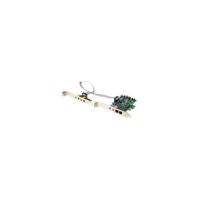
Startech.com 7.1 Channel Sound Card - Pci Express - 24-bit - 192khz - C-media Cm8828 - Pci Express X1 - 92 Db - S/pdif Out: StarTech.com 7.1 Channel Sound Card - PCI Express - 24-bit - 192KHz - C-Media CM8828 - PCI Express x1 - 92 dB - S/PDIF Out

Manhattan Parallel Pci Express Card (158176): PCI Express Balances Cost Performance Compatibility and Advanced Features for Computing Platforms The MANHATTAN Parallel PCI Express Card quickly and easily adds one DB25 port to PCI Express-enabled desktop systems to co...

Manhattan Serial Pci Express Card (158152): PCI Express Balances Cost Performance Compatibility and Advanced Features for Computing Platforms The MANHATTAN Serial PCI Express Card quickly and easily adds one DB9 port to PCI Express-enabled desktop systems to conne...
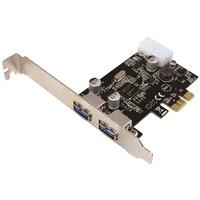
Logilink® Pc0054a Pc0054 2port Usb 3.0 Pci Express Card: LogiLink-PC0054-2-Port-USB-3-0-PCI-Express-Card-LogiLink-PC0054A-P-align-left-LogiLink-s-reg-2-Port-USB-3-0-PCI-Express-Card-is-the-ideal-way-of-creating-2-additional-USB-3-0-female-ports-The-interface-is-installed-into-the-computer-s-PCI-Express-port-and-automatically-detected-by-the-Plug-and-Play-operating-system-P-P-align-left-Equipped-with-a-USB-legacy-function-that-is-compatible-with-USB-2-0-or-1-1-devices-while-supporting-USB-3-0-transfer-rates-up-to-5-Gbps-along-with-a-power-...
Startech.com 6in Lp4 To 6 Pin Pci Express Video Card Power Cable Adapter - 6 Pin Internal Power (m) - 4 Pin Atx12v (m) - 15.2 Cm - For Pci Express Car: StarTech.com 6in LP4 to 6 Pin PCI Express Video Card Power Cable Adapter - 6 pin internal power (M) - 4 pin ATX12V (M) - 15.2 cm - For PCI Express Card
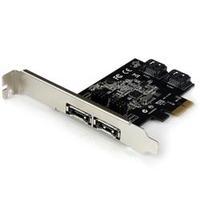
Startech.com 2 Port Pci Express Sata 6 Gbps Esata Controller Card - 2 Int/2 Ext: Add 2 external or internal SATA 6 Gbps ports to a computer, through a PCI Express slot. The PEXESAT322I PCI Express SATA III Controller Card (6 Gbps) gives you the option to add 2 internal or external SATA ports to your computer, through a single PCI Express (x1) card slot. The card features on board jumper selection, which enables you to configure the card to provide 2 internal or external SATA III ports, or one of each, as needed. The SATA III card features Port Multiplier (PM) support on...

Startech.com 2 Port Pci Express / Pci-e Parallel Adapter Card ? Ieee 1284 With Low Profile Bracket: Add 2 high-speed IEEE 1284 parallel ports (EPP/ECP/SPP/PS2) to your desktop computer through a PCI Express expansion slot. The PEX2PECP2 2 Port PCI Express Parallel Adapter Card - EPP/ECP/SPP/PS2 parallel card adds two IEEE 1284 parallel ports to your PC, with support for parallel data communication at speeds of up to 1.5 Mbps. This high performance 2 Port PCI Express parallel card adds 2 DB25 parallel ports, perfect for connecting printers, scanners, memory card readers, bar code scanners...
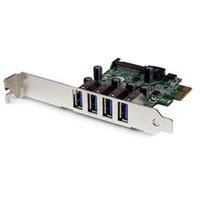
Startech.com 4 Port Pci Express Pcie Superspeed Usb 3.0 Controller Card Adapter With Uasp: Add 4 external USB 3.0 ports to a low profile or standard computer, through PCI Express. The PEXUSB3S4V PCI Express USB 3.0 Card (with SATA Power) adds 4 external USB 3.0 ports to any PCI Express-enabled computer system with support for data rates up to 5 Gbps, while remaining backward compatible with USB 2.0 / 1.x devices. Enhanced with UASP support (USB Attached SCSI Protocol), this USB 3.0 controller performs up to 70% faster than conventional USB 3.0 when paired with a UASP supported...
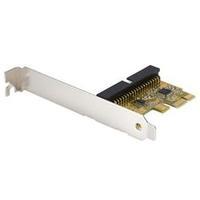
Startech.com 1 Port Pci Express Ide Controller Adapter Card: This PCI Express IDE Controller Adapter Card provides a cost-effective way to use legacy drives with modern computers, by converting a PCI Express port into an IDE port. Providing data burst transfer rates of up to 133MBps and support for PIO 0/1/2/3/4 and UDMA 33/66/100/133 operating modes, the IDE controller card offers an efficient way to add an IDE channel with support for two IDE drives on the same channel. A complete dual profile solution, the PCI Express IDE controller card...
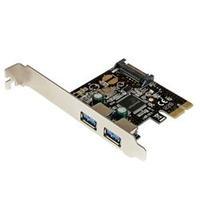
Startech.com 2 Port Pci Express Pcie Superspeed Usb 3.0 Controller Card W/ Sata Power: Add two USB 3.0 ports to your desktop computer through a PCI Express slot. The PEXUSB3S23 2-Port PCI Express USB 3.0 Card lets you add two USB 3.0 ports to any PCI Express-enabled computer system. The USB card requires SATA power for functionality, and delivers 900mA of power per port to USB 3.0 bus-powered devices (500mA for USB 2.0) via your computers SATA power connector. The PCIe USB 3.0 adapter is compliant with USB 3.0 standards for data transfer speeds up to 5 Gbps, while still...
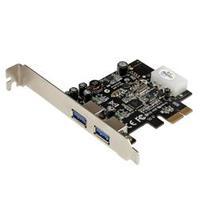
Startech.com 2 Port Pci Express (pcie) Superspeed Usb 3.0 Card Adapter With Uasp - Lp4 Power: Add 2 SuperSpeed USB 3.0 ports to your PCI Express-enabled PC. The PEXUSB3S25 2-Port PCI Express USB 3.0 Card lets you add two USB 3.0 ports to your PCI Express-enabled computer system, with an optional LP4 power connector to connect to your system power supply and deliver up to 900mA of power per port to USB 3.0 bus-powered devices (500mA for USB 2.0). Enhanced with UASP support (USB Attached SCSI Protocol), this USB 3.0 controller performs up to 70% faster than conventional USB 3.0 when...
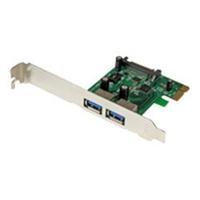
Startech.com 2 Port Pci Express (pcie) Superspeed Usb 3.0 Card Adapter With Uasp - Sata Power: Add 2 SuperSpeed USB 3.0 ports with SATA power to your PCI Express-enabled PC. The PEXUSB3S24 2-Port PCI Express USB 3.0 Card lets you add two USB 3.0 ports to your PCI Express-enabled computer system, with an optional SATA power connector to connect to your system power supply and deliver up to 900mA of power per port to USB 3.0 bus-powered devices (500mA for USB 2.0). Enhanced with UASP support (USB Attached SCSI Protocol), this USB 3.0 controller performs up to 70% faster than...
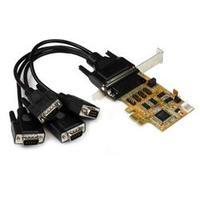
Startech.com 4 Port Pci Express (pcie) Rs232 Serial Card W/ Power Output And Esd Protection: Add four ESD-Protected RS232 ports, with 5V or 12V selectable power output through a PCI Express slot. The PEX4S553S 4-Port PCI Express Serial Card lets you add four ESD-Protected RS232 ports, with 5V or 12V selectable power output through a PCI Express slot. Ideal for industrial environments, this 4-port serial card offers built-in 15KV ESD-protection which helps prevent damage to connected devices in the event of line surges and electro-static discharge. Plus, for devices that require...
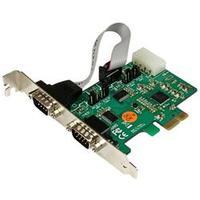
Startech.com 2 Port Industrial Pci Express Pcie Rs232 Serial Card W/ Power Output And Esd Protection: Add two high speed, ESD-Protected RS232 ports, with 5V or 12V selectable power output through a PCI Express slot. The PEX2S553S 2-Port PCI Express Serial Card lets you add twoESD-Protected RS232 ports with 5V or 12V selectable power output, through a PCI Express slot. Ideal for industrial environments, this 2-port serial card offers built-in 15KV ESD-protection which helps prevent damage to connected devices in the event of line surges and electro-static discharge. An extended operating...

Startech.com 6in Lp4 To 6 Pin Pci Express Video Card Power Cable Adapter: Convert a Standard LP4 Power Supply Connector to a 6-pin PCI Express Video Card Power Connector. This 6in LP4 to 6 Pin PCI Express Video Card Power Adapter converts a standard LP4 power connector on your existing power supply to a 6 pin PCI Express video card power connector, allowing you to install a PCIe graphics card without having to upgrade the computer power supply.
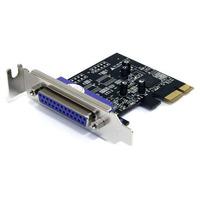
Startech.com Pex1plp 1 Port Pci Express Low Profile Parallel Adapt...: StarTech-com-PEX1PLP-1-Port-PCI-Express-Low-Profile-Parallel-Adaptor-Card-StarTech-com-PEX1PLP-P-This-PEX1PLP-PCIe-Parallel-Adaptor-card-from-StarTech-com-can-be-installed-in-a-PCI-Express-PCIe-x1-slot-enabling-you-to-connect-EPP-ECP-parallel-peripherals-to-any-computer-while-relying-on-a-native-single-chip-design-Oxford-OXPCIe952-that-harnesses-the-capability-of-true-PCI-Express-to-ensure-maximum-performance-and-reliability-P-P-This-high-performance-SPP-EPP-ECP-parallel-card-adds-...
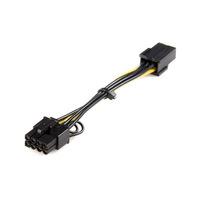
Startech Pciex68adap Pci Express 6-pin To 8-pin Power Adaptor Cable: StarTech.com PCI Express 6-pin Power Adaptor/Splitter Cables - StarTech.com PCIEX68ADAP, The StarTech.com PCIEX68ADAP PCI Express 6-pin to 8-pin power adaptor cable lets you connect a standard 6-pin PCI Express power connection provided by the computer power supply to ATI and NVIDIA video cards that require an 8-pin power connection. The PCIe power adaptor eliminates the expense of upgrading a computer power supply for the sake of compatibility with a newer video card. StarTech PCIeX68ADAP PCI...
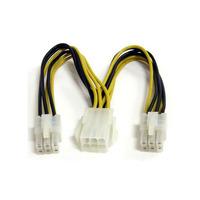
Startech Pciexsplit6 150mm Pci Express 6-pin Power Splitter Cable: StarTech.com PCI Express 6-pin Power Adaptor/Splitter Cables - StarTech.com PCIEXSPLIT6, The StarTech.com PCIEXSPLIT6 PCI Express power splitter cable lets you connect a standard 6-pin PCI Express power connection provided by the computer power supply to 2 x NVIDIA SLI or ATI CrossfireX video cards that require a 6-pin power connection. This PCIe power cable eliminates the expense of upgrading a computer power supply for the sake of compatibility with dual video cards. Backed by StarTech.com...
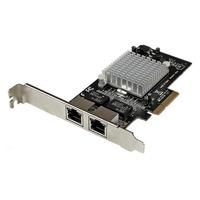
Startech.com St2000spexi 2 Port Pci Express Gigabit Ethernet Netwo...: StarTech.com PCI Express Network Cards - StarTech.com ST2000SPEXI, This PCI Express Dual Port Gigabit Network Card from StarTech.com lets you add two gigabit Ethernet ports to a desktop computer through a single, four-lane (x4 or higher) PCI Express slot. Each port is fully compatible with IEEE 802.3/u/ab standards, for 10/100/1000 Mbps auto-negotiation. This 2-port GbE network card is based on the high-performance Intel® I350 chipset, which offers several advanced driver options including...
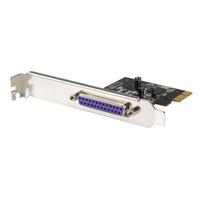
Startech.com Pex1p 1 Port Pci-express Parallel Card: StarTech.com OCI Express Parallel Adapter Cards - StarTech.com PEX1P, This PCIe Parallel Adaptor card from StarTech.com can be installed in a PCI Express (PCIe) slot, allowing you to connect EPP/ECP parallel peripherals to any computer system. Relying on a native single-chip design (Oxford OXPCIe952), this adaptor harnesses the true capability of PCI Express to ensure maximum performance and reliability. This high performance SPP/EPP/ECP parallel card adds one DB25 parallel port, perfect for...
 Soundtrap
 Movavi
 Wondershare
 Cyberlink
 Magix Multimedia Software
 A Shampoo
 Corel Store
 Nero
 Adobe
 Filmstro
 NCH Software
 Roxio Software