Choose Which Site You Want To See



Roxio Software is a multimedia brand offering tools for managing, editing, and converting digital media across common formats.
Its products cover areas such as disc burning, video editing, screen recording, and media organisation, aiming to support users who want straightforward ways to handle personal content. The software may suit individuals looking for accessible, feature-focused applications without requiring advanced technical skills. It typically appeals to home users, hobbyists, and those who need practical tools for everyday media tasks. Features and interfaces can vary across versions, so users may benefit from reviewing product details before choosing.
Roxio Software is a long‑standing digital media brand offering tools for disc burning, file conversion, media management, and creative editing. It is known for consumer‑focused software that supports tasks such as backing up data, creating DVDs, editing photos or videos, and managing large digital libraries. Over many years in the digital media space, the brand has positioned itself as an accessible and practical option for users who want structured tools for managing, preserving, or enhancing their content without needing advanced production environments.
Roxio Software operates within the consumer software market, particularly the media utility and creativity segment. Its product range is often associated with disc authoring and multimedia handling, although it has expanded into broader creativity functions including photo enhancement and video editing. This positions the brand as an option for users who want software that is functional, straightforward, and built around specific everyday tasks rather than specialist studio‑grade production.
The brand’s catalogue includes long‑established products such as Creator and Toast, which serve as multi‑tool suites for media organisation and content creation. These products carry recognition due to their continuity in the market and their focus on approachable interfaces. The software is generally presented as suitable for home users, hobbyists, and individuals who need regular control over their media collections. Overall, expectations for Roxio Software centre on usability, practicality, and familiarity, rather than highly complex or professional‑tier functionality.
Browse the full range on the Roxio Software website.
Roxio Software is widely recognised for its all‑in‑one multimedia suites, which combine video editing, photo enhancement, disc burning, and file management. These suites are structured to give users an integrated environment for routine media tasks. Typical features include timeline‑based video editing, audio adjustment tools, slideshow creation, and options for converting or exporting files into various formats.
The brand offers specialised tools for burning CDs, DVDs, and Blu‑ray discs. These applications allow users to duplicate discs, archive files, create audio compilations, and design disc menus. The focus is on reliability, structured workflows, and compatibility with common disc formats.
Conversion utilities are a core part of the Roxio range. These tools support transferring media between devices, converting file types, and preparing content for different playback environments. The emphasis is on simplicity and familiarity, making them suitable for users who prefer clear controls.
Roxio Software includes entry‑level video editing features designed for everyday projects. These tools support trimming, combining clips, adding titles, and applying effects. They are often used for home videos, event recordings, and basic content creation.
Basic photo editing applications provide functions such as cropping, colour correction, blemish repair, and image organisation. These tools are geared towards users who want accessible features for enhancing personal photos rather than advanced photographic manipulation.
Some Roxio products include screen recording features for capturing tutorials, gameplay, or software demonstrations. These tools typically offer options for audio capture and export in various formats.
Backup tools support the creation of data archives on discs or other storage media. These features appeal to users who prefer physical copies of important files and want structured backup processes.
Media organisation tools help users sort, label, and manage large libraries of videos, photos, and audio files. These functions align with Roxio’s focus on practical home‑use management.
Authoring tools enable the creation of themed menus, chapter markers, and structured DVD layouts. These functions support users producing physical media for events or personal collections.
Some products offer audio‑specific tools such as noise reduction, basic mixing, track splitting, or format conversion. These features are designed for everyday audio tasks rather than advanced production.
Roxio Software positions itself as a practical, consumer‑oriented brand focused on helping users manage, preserve, and enhance their digital media. The brand’s long history in disc authoring contributes to its familiarity among users who value traditional media workflows alongside digital ones. Its operating approach centres on providing integrated toolsets that simplify tasks such as editing, conversion, or archiving.
The emphasis on structured interfaces and guided workflows reflects an accessible positioning. Rather than pursuing specialist professional markets, the brand aims to provide tools that support everyday digital media activities. This makes it relevant to users who want software that fits into home projects without requiring advanced technical knowledge.
Interacting with Roxio Software typically involves a clear, task‑orientated interface. Suites are laid out with menus organised by activity such as burning, editing, or conversion. This helps users navigate directly to the tool they need. For those accustomed to older versions, the continuity in design can make upgrading or transitioning smoother.
The overall experience is geared towards usability. Information is generally presented in a straightforward manner and tools are grouped logically. Many users approach the brand for familiar tasks such as backing up files or creating physical media, and the software design reflects those common workflows. Accessibility features are present in varying forms across products, although the level of detail can vary depending on the suite.
Roxio Software is known for its digital media tools, particularly disc burning, media conversion, and creative editing. It has built recognition through long‑running products that focus on accessibility and structured workflows. Many users associate the brand with practical tools for organising and preserving media collections.
Roxio Software operates by offering desktop applications that support editing, burning, backing up, and organising media. The software groups functions into suites to give users an integrated environment. The focus is on providing clear navigation and familiar tools suitable for everyday use.
The software is typically used by home users and hobbyists who need approachable tools for creating DVDs, editing photos or videos, converting files, or managing large media libraries. It can also suit users who prefer offline applications for their workflows.
Roxio Software can be suitable for beginners because it focuses on clarity and guided workflows. The tools are designed to support common tasks without extensive learning curves. Users seeking highly advanced features may find the tools oriented towards mainstream rather than specialist use.
Roxio Software compares to alternatives by emphasising integrated disc burning and media management tools. While some alternatives specialise in advanced editing or cloud workflows, Roxio takes a more traditional approach centred on offline functionality and everyday tasks.
Users may want to know that Roxio focuses on familiarity, practical tools, and conventional workflows. Those who require highly specialised or professional‑grade features may find the software oriented more towards home and hobbyist use. Exploring the features within each suite helps users decide which tools fit their needs.
Roxio Software occupies a familiar position in the consumer digital media landscape. Its tools are designed to support everyday tasks such as disc burning, media conversion, basic editing, and library organisation. The brand maintains a practical and accessible approach, making it a recognised option for users who value clarity, offline functionality, and integrated toolsets.
The software is typically suited to home users and hobbyists who want reliable ways to manage their media collections or create simple projects. While not designed for specialist or professional‑grade production environments, the suites offer a breadth of features that can be helpful for personal use. The experience centres on logical navigation, continuity across product versions, and usability.
Overall, Roxio Software serves as a long‑established choice for individuals seeking structured tools to handle digital media tasks in a straightforward way. Its continuing presence in the market reflects ongoing appeal for users who prefer dedicated desktop software for their media workflows.
Ready to shop? See the full range on the Roxio Software website.
This guide was written by AI. It does not represent the views or opinions of the website owner.
Updated October 2026

Microsdhc Card 32 Gb Sandisk Android Class 10, Uhs-i Incl. Sd Adapter, Incl. Android Software: microSDHC card 32 GB SanDisk Android Class 10, UHS-I incl. SD adapter, incl. Android software

Microsdhc Card 16 Gb Sandisk Android Class 10, Uhs-i Incl. Sd Adapter, Incl. Android Software: microSDHC card 16 GB SanDisk Android Class 10, UHS-I incl. SD adapter, incl. Android software

Microsdxc Card 128 Gb Sandisk Android Class 10, Uhs-i Incl. Sd Adapter, Incl. Android Software: microSDXC card 128 GB SanDisk Android Class 10, UHS-I incl. SD adapter, incl. Android software

Microsdxc Card 64 Gb Sandisk Android Class 10, Uhs-i Incl. Sd Adapter, Incl. Android Software: microSDXC card 64 GB SanDisk Android Class 10, UHS-I incl. SD adapter, incl. Android software
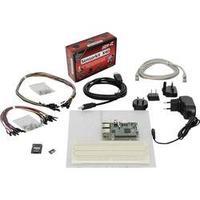
Raspberry Pi® 3 Model B 1 Gb Incl. Psu, Incl. Software: Raspberry Pi® 3 Model B 1 GB incl. PSU, incl. software
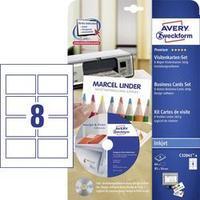
Printable Business Cards (smooth Edge + Design Software) Avery-zweckform C32041-8 85 X 54 Mm 260 Gm² White 64 Pc(s): Printable business cards (smooth edge + design software) Avery-Zweckform C32041-8 85 x 54 mm 260 gm² White 64 pc(s)
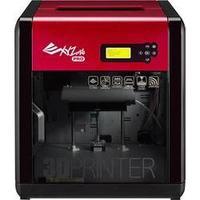
Xyzprinting Da Vinci 1.0 Pro 3d Printer Incl. Software: XYZprinting da Vinci 1.0 Pro 3D printer incl. software

Acronis True Image 2017 1 Computer - Electronic Software Download: Acronis True Image is the fastest, easiest, most complete backup software on the market. Ensure the protection and security of your personal digital information by backing up everything - operating systems, programs, settings, Facebook feeds, smartphones, and tablets. Back up to local storage, NAS, or the Acronis Cloud with the assurance of Dual-Protection. Remote backup allows you to back up a computer in a remote location. Mobile backup is available for an unlimited number of devices and allows for...

Acronis True Image 2017 5 Computers - Electronic Software Download: Acronis True Image is the fastest, easiest, most complete backup software on the market. Ensure the protection and security of your personal digital information by backing up everything - operating systems, programs, settings, Facebook feeds, smartphones, and tablets. Back up to local storage, NAS, or the Acronis Cloud with the assurance of Dual-Protection. Remote backup allows you to back up a computer in a remote location. Mobile backup is available for an unlimited number of devices and allows for...

Acronis True Image 2017 3 Computers - Electronic Software Download: Acronis True Image is the fastest, easiest, most complete backup software on the market. Ensure the protection and security of your personal digital information by backing up everything - operating systems, programs, settings, Facebook feeds, smartphones, and tablets. Back up to local storage, NAS, or the Acronis Cloud with the assurance of Dual-Protection. Remote backup allows you to back up a computer in a remote location. Mobile backup is available for an unlimited number of devices and allows for...

Norton Security Premium 3.0 25gb 1 User 10 Devices - Electronic Software Download: See more, analyze more and stop more online threats How long does it take for malware to infect your computer? If you use free or other inferior security software, maybe not long at all. Cybercriminals are more sophisticated than ever before, and they use a diverse arsenal of tools to gain access to your information. Other security products just don\'t have the resources to keep up with threats as they emerge. But Norton products do. As the threats get worse, the products just keep getting better....

Norton Security Deluxe V.3.0) 1 User 3 Devices - Electronic Software Download: See more, analyze more and stop more online threats How long does it take for malware to infect your computer? If you use free or other inferior security software, maybe not long at all. Cybercriminals are more sophisticated than ever before, and they use a diverse arsenal of tools to gain access to your information. Other security products just don't have the resources to keep up with threats as they emerge. But Norton products do. As the threats get worse, the products just keep getting...

Norton Security Deluxe 3.0 1 User 5 Devices - Electronic Software Download: See more, analyze more and stop more online threats How long does it take for malware to infect your computer? If you use free or other inferior security software, maybe not long at all. Cybercriminals are more sophisticated than ever before, and they use a diverse arsenal of tools to gain access to your information. Other security products just don\'t have the resources to keep up with threats as they emerge. But Norton products do. As the threats get worse, the products just keep getting better....

Norton Security Deluxe 3.0 1 User 5 Devices - Electronic Software Download: See more, analyze more and stop more online threats How long does it take for malware to infect your computer? If you use free or other inferior security software, maybe not long at all. Cybercriminals are more sophisticated than ever before, and they use a diverse arsenal of tools to gain access to your information. Other security products just don\'t have the resources to keep up with threats as they emerge. But Norton products do. As the threats get worse, the products just keep getting better....

Norton Security Premium 3.0 25gb 1 User 10 Devices - Electronic Software Download: See more, analyze more and stop more online threats How long does it take for malware to infect your computer? If you use free or other inferior security software, maybe not long at all. Cybercriminals are more sophisticated than ever before, and they use a diverse arsenal of tools to gain access to your information. Other security products just don\'t have the resources to keep up with threats as they emerge. But Norton products do. As the threats get worse, the products just keep getting better....
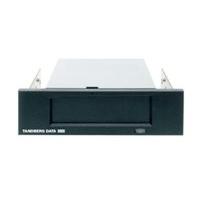
Tandberg Quikstor Internal Rdx Drive Usb With Accuguard Rdx Software And 5.25" Bezel: Product Overview 80, 160, 320 or 500GB of capacity on one cartridge Fast Access - Blistering disk-based speed and access, backing up to 162GB/hr and near-instant file retrieval Reliable, Automated Backup and Recovery - Easy-to-use software solution for the RDX QuikStor provides “set it and forget it” data protection with 20:1 data deduplication S-ATA or USB 2.0 high speed interface Shock proof design, ruggedized cartridge Cost-effective solution that suits all sectors from SOHO...
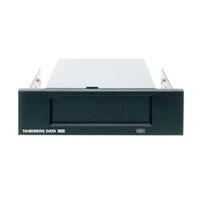
Tandberg Quikstor Internal Rdx Drive Sata With Accuguard Rdx Software And 5.25" Bezel: Product Overview 80, 160, 320 or 500GB of capacity on one cartridge Fast Access - Blistering disk-based speed and access, backing up to 162GB/hr and near-instant file retrieval Reliable, Automated Backup and Recovery - Easy-to-use software solution for the RDX QuikStor provides “set it and forget it” data protection with 20:1 data deduplication S-ATA or USB 2.0 high speed interface Shock proof design, ruggedized cartridge Cost-effective solution that suits all sectors from SOHO...

Hpe Best Designer Edition Xl Software: HPE Best Designer Edition Software Q5631A. Best Designer Edition for HPE is a professional Mac based proofing solution for the HPE DesignJet 10ps/20ps printer. With the application of ICC profiles, Best Designer Edition is able to simulate on your printer the most varied of output devices. In the processing of print jobs, Best Designer Edition for HPE DesignJet 10ps/20ps solves the problem of inadequate colour communication between customer, agency and print shop. With Best Designer Edition...

Adobe Contribute ( V. 6.5 )- Mac- Electronic Software Download: Adobe® Contribute® 6.5 software is a powerful web publishing and website management tool that integrates authoring, reviewing, and publishing in an easy-to-use WYSIWYG HTML editor. Increase web publishing productivity while simplifying oversight and approval tasks. Contribute 6.5 also includes support for HTML5 and JQuery mobile. Enable content authors to see the results of their edits and additions instantly with enhanced CSS rendering, without writing code or knowing HTML....

Adobe Flash Builder Standard V. 4.7 Software Download: Adobe Flash Builder 4.7 software is a development environment for building games and applications using the ActionScript language and the open-source Flex framework.
 Magix Multimedia Software
 Flashback Express
 Cyberlink
 Wondershare
 Soundtrap
 Movavi
 Corel Store
 Adobe
 Video Scribe From Sparkol
 Clip Champ
 Magix
 NCH Software