Choose Which Site You Want To See



Roxio Software is a multimedia brand offering tools for managing, editing, and converting digital media across common formats.
Its products cover areas such as disc burning, video editing, screen recording, and media organisation, aiming to support users who want straightforward ways to handle personal content. The software may suit individuals looking for accessible, feature-focused applications without requiring advanced technical skills. It typically appeals to home users, hobbyists, and those who need practical tools for everyday media tasks. Features and interfaces can vary across versions, so users may benefit from reviewing product details before choosing.
Roxio Software is a long‑standing digital media brand offering tools for disc burning, file conversion, media management, and creative editing. It is known for consumer‑focused software that supports tasks such as backing up data, creating DVDs, editing photos or videos, and managing large digital libraries. Over many years in the digital media space, the brand has positioned itself as an accessible and practical option for users who want structured tools for managing, preserving, or enhancing their content without needing advanced production environments.
Roxio Software operates within the consumer software market, particularly the media utility and creativity segment. Its product range is often associated with disc authoring and multimedia handling, although it has expanded into broader creativity functions including photo enhancement and video editing. This positions the brand as an option for users who want software that is functional, straightforward, and built around specific everyday tasks rather than specialist studio‑grade production.
The brand’s catalogue includes long‑established products such as Creator and Toast, which serve as multi‑tool suites for media organisation and content creation. These products carry recognition due to their continuity in the market and their focus on approachable interfaces. The software is generally presented as suitable for home users, hobbyists, and individuals who need regular control over their media collections. Overall, expectations for Roxio Software centre on usability, practicality, and familiarity, rather than highly complex or professional‑tier functionality.
Browse the full range on the Roxio Software website.
Roxio Software is widely recognised for its all‑in‑one multimedia suites, which combine video editing, photo enhancement, disc burning, and file management. These suites are structured to give users an integrated environment for routine media tasks. Typical features include timeline‑based video editing, audio adjustment tools, slideshow creation, and options for converting or exporting files into various formats.
The brand offers specialised tools for burning CDs, DVDs, and Blu‑ray discs. These applications allow users to duplicate discs, archive files, create audio compilations, and design disc menus. The focus is on reliability, structured workflows, and compatibility with common disc formats.
Conversion utilities are a core part of the Roxio range. These tools support transferring media between devices, converting file types, and preparing content for different playback environments. The emphasis is on simplicity and familiarity, making them suitable for users who prefer clear controls.
Roxio Software includes entry‑level video editing features designed for everyday projects. These tools support trimming, combining clips, adding titles, and applying effects. They are often used for home videos, event recordings, and basic content creation.
Basic photo editing applications provide functions such as cropping, colour correction, blemish repair, and image organisation. These tools are geared towards users who want accessible features for enhancing personal photos rather than advanced photographic manipulation.
Some Roxio products include screen recording features for capturing tutorials, gameplay, or software demonstrations. These tools typically offer options for audio capture and export in various formats.
Backup tools support the creation of data archives on discs or other storage media. These features appeal to users who prefer physical copies of important files and want structured backup processes.
Media organisation tools help users sort, label, and manage large libraries of videos, photos, and audio files. These functions align with Roxio’s focus on practical home‑use management.
Authoring tools enable the creation of themed menus, chapter markers, and structured DVD layouts. These functions support users producing physical media for events or personal collections.
Some products offer audio‑specific tools such as noise reduction, basic mixing, track splitting, or format conversion. These features are designed for everyday audio tasks rather than advanced production.
Roxio Software positions itself as a practical, consumer‑oriented brand focused on helping users manage, preserve, and enhance their digital media. The brand’s long history in disc authoring contributes to its familiarity among users who value traditional media workflows alongside digital ones. Its operating approach centres on providing integrated toolsets that simplify tasks such as editing, conversion, or archiving.
The emphasis on structured interfaces and guided workflows reflects an accessible positioning. Rather than pursuing specialist professional markets, the brand aims to provide tools that support everyday digital media activities. This makes it relevant to users who want software that fits into home projects without requiring advanced technical knowledge.
Interacting with Roxio Software typically involves a clear, task‑orientated interface. Suites are laid out with menus organised by activity such as burning, editing, or conversion. This helps users navigate directly to the tool they need. For those accustomed to older versions, the continuity in design can make upgrading or transitioning smoother.
The overall experience is geared towards usability. Information is generally presented in a straightforward manner and tools are grouped logically. Many users approach the brand for familiar tasks such as backing up files or creating physical media, and the software design reflects those common workflows. Accessibility features are present in varying forms across products, although the level of detail can vary depending on the suite.
Roxio Software is known for its digital media tools, particularly disc burning, media conversion, and creative editing. It has built recognition through long‑running products that focus on accessibility and structured workflows. Many users associate the brand with practical tools for organising and preserving media collections.
Roxio Software operates by offering desktop applications that support editing, burning, backing up, and organising media. The software groups functions into suites to give users an integrated environment. The focus is on providing clear navigation and familiar tools suitable for everyday use.
The software is typically used by home users and hobbyists who need approachable tools for creating DVDs, editing photos or videos, converting files, or managing large media libraries. It can also suit users who prefer offline applications for their workflows.
Roxio Software can be suitable for beginners because it focuses on clarity and guided workflows. The tools are designed to support common tasks without extensive learning curves. Users seeking highly advanced features may find the tools oriented towards mainstream rather than specialist use.
Roxio Software compares to alternatives by emphasising integrated disc burning and media management tools. While some alternatives specialise in advanced editing or cloud workflows, Roxio takes a more traditional approach centred on offline functionality and everyday tasks.
Users may want to know that Roxio focuses on familiarity, practical tools, and conventional workflows. Those who require highly specialised or professional‑grade features may find the software oriented more towards home and hobbyist use. Exploring the features within each suite helps users decide which tools fit their needs.
Roxio Software occupies a familiar position in the consumer digital media landscape. Its tools are designed to support everyday tasks such as disc burning, media conversion, basic editing, and library organisation. The brand maintains a practical and accessible approach, making it a recognised option for users who value clarity, offline functionality, and integrated toolsets.
The software is typically suited to home users and hobbyists who want reliable ways to manage their media collections or create simple projects. While not designed for specialist or professional‑grade production environments, the suites offer a breadth of features that can be helpful for personal use. The experience centres on logical navigation, continuity across product versions, and usability.
Overall, Roxio Software serves as a long‑established choice for individuals seeking structured tools to handle digital media tasks in a straightforward way. Its continuing presence in the market reflects ongoing appeal for users who prefer dedicated desktop software for their media workflows.
Ready to shop? See the full range on the Roxio Software website.
This guide was written by AI. It does not represent the views or opinions of the website owner.
Updated October 2026
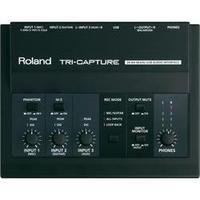
Audio Interface Roland Ua-33 Incl. Software, Monitor Controlling: Audio interface Roland UA-33 incl. software, Monitor controlling

Audio Interface Steinberg Ur242 Monitor Controlling, Incl. Software: Audio interface Steinberg UR242 Monitor controlling, incl. software

Audio Interface Steinberg Ur12 Monitor Controlling, Incl. Software: Audio interface Steinberg UR12 Monitor controlling, incl. software

Audio Interface Steinberg Ur22 Mkii Incl. Software, Monitor Controlling: Audio interface Steinberg UR22 MKII incl. software, Monitor controlling

Adobe Flash Builder Standard V. 4.7 Software Download: Adobe Flash Builder 4.7 software is a development environment for building games and applications using the ActionScript language and the open-source Flex framework.

Adobe Photoshop Lightroom (v.6) License 1 User - Electronic Software Download: Adobe Photoshop Lightroom software provides a comprehensive set of digital photography tools, from powerfully simple one-click adjustments to cutting-edge advanced controls. Create images that inspire, inform, and delight. Get a start-to-finish toolset Organize, perfect, and share your images using a comprehensive set of digital photography tools in a fast, efficient application. Excellence in every image Great images come from DSLRs and camera phones alike. Get the highest possible quality from...

Coldfusion Standard 2016 Electronic Software Download: Adobe ColdFusion Standard (2016 release) Use a single platform to rapidly build and deploy web and mobile applications. Leverage unique capabilities for end-to-end mobile application development. Generate high-quality PDFs, and make your server more secure with default server lockdown. License The license is for one user, and can be installed on two devices. The purchase is one time only with no future subscription fees, and you may continue to use the software for as long as you wish.

Adobe Presenter (v. 11) Windows Electronic Software Download: Adobe Presenter 11 software lets you create HD video lectures for classroom teaching, distance learning, flipped learning and MOOC sessions. Simultaneously capture your screen content along with your webcam video or turn your slides into interactive eLearning with out-of-the-box assets and eye-catching quizzes. Quickly create studio quality video lectures by capturing your screen content along with your audio or video, right from your desktop. Use a simple 3-button interface to easily edit and...
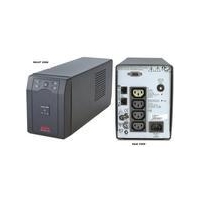
Apc Sc420i Smart-ups 420va 260w Serial With Shutdown Software: For the replacement battery please see Quick Find 2983. APC Smart UPS SC is ideal for small and medium businesses looking to protect entry-level servers and networking equipment from power disturbances and outages. The Smart-UPS SC features network grade runtime, hot swap batteries, and built-in data line protection for worry free uninterruptible power protection for increased availability. The included PowerChute Business Edition software, which has an installed base in the millions, gives...
Corelcad 2016 - Electronic Software Download: Discover the powerful and affordable CAD software that transforms 2D designs into 3D reality. CorelCAD 2016 provides customizable 2D drafting tools and superior 3D design tools within an interactive workspace to achieve your CAD goals in all types of industries. Increase your workflow productivity with native DWG file format support for worry-free collaboration on CAD files with colleagues and business partners. Work in a familiar environment with the ribbon UI, 3D print-ready features and STL...

Corel Paintshop Pro X8 Ultimate - Electronic Software Download: Create your best photos ever with Corel PaintShop Pro X7. With smarter editing features, 30% faster brushes, creative tools and easier color selection, this complete photo-editing software helps you turn your snapshots into beautiful, gallery-worthy images. A great fit for all skill levels, PaintShop Pro X7 brings out the best in your photos that matter.

Magix Video Pro X7 - Electronic Software Download: MAGIX Video Pro X7 is the perfect editing software for intuitive and powerful video production. This multi-award-winning video editing suite is geared towards the unique requirements of ambitious and professional users, and offers an unrivaled range of powerful post-production tools. Video editing Choose from a wide range of tools to perfect your footage, including GPU-optimized video effects, precise measurement instruments and multicam editing. Audio editing A real-time audio mixer, keyframe...

Magix Audio Cleaning Lab 2016 - Electronic Software Download: MAGIX Audio Cleaning Lab 2016 was developed to let you get the most out of your audio material in the shortest possible time. Fade out noise and get away from the daily grind too. Easy handling, thematic sound settings, and professional audio technology make this software a true multi-tool for achieving excellent sound.

Magix Music Maker 2017 - Electronic Software Download: With MAGIX Music Maker software, making your own music has never been simpler. Produce your own songs easily on your PC using the mouse and keyboard. Feel good tracks will be pumping through your speakers in just a few simple clicks!

Magix Video Pro X - Electronic Software Download: From the market leader for video software:MAGIX presents Video Pro X, a high-performance video editing program for professional and ambitious users with high standards. Highly developed video technology, optimal workflow, a flexible user interface, and diverse functions specifically for the special requirements of video editing pros all combine to make MAGIX Video Pro X, a must-have tool for everyone who appreciates perfect results! MAGIX Video Pro X is a specialist for H(DV)recordings,...

Xara Designer Pro X11 - Electronic Software Download: Xara Designer Pro X11 is the complete design software solution. It brings together web design, image editing, graphic design, desktop publishing (DTP) and presentation in a single program. It's not only practical, but hugely efficient. Add designs to business cards, websites and presentations in a flash. Create all your illustrations and infographics directly in Xara Designer Pro X11. Edit images easily in their completed layout. Professional image processing and photo retouching Supports...
Windows 10 Home 32/64-bit Electronic Software Download: Windows 10 is the best ever - familiar, easy to use, and packed with great new features for staying organized, having fun, and getting things done. It\'s the Windows you love - and the Windows you can\'t wait to get. Product Features: Familiar and easy to use. The familiar Start menu is back and better than ever, to give you quick access to your most important things. And Windows works with more hardware and software, including what you already have. Fast and smooth. Windows 10 starts fast,...

Paperport 14 - Electronic Software Download: PaperPort 14 is the popular scanning and document management software application designed for home office use. An easy-to-use combination of traditional file cabinet and digital document desktop, PaperPort 14 enables you to scan, organize, find, and share all of your documents and photos from your PC. PaperPort 14 enhances the capabilities of your scanner or all-in-one device to quickly transform paper - mail, photos, legal paperwork, tax information, forms, bills, receipts warranties, and other...

Nuance Power Pdf Advanced (v. 2.0) - Electronic Software Download: PDF is the standard format for business document collaboration. Yet, most users lack adequate PDF power. The high price of competitive solutions makes powerful PDF software unobtainable for most while the limited capabilities of low-priced alternatives leave users powerless. As a result, collaboration and productivity is hindered. Nuance Power PDF Advanced puts an end to all of that. Power PDF Advanced provides all the capabilities business users need at a price businesses can justify. So now...
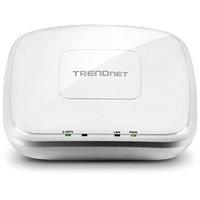
Trendnet N300 Poe Access Point (with Software Controller): TRENDnet’s high performance N300 PoE Access Point, model TEW-755AP, supports Access Point (AP), Client, Wireless Distribution System (WDS) AP, WDS Bridge, WDS Station, and Repeater modes. It generates a 300 Mbps WiFi N network and features a Gigabit PoE port. The included Windows-based software controller manages multiple TEW-755APs and reduces WiFi management/troubleshooting time. A low profile housing blends into most environments and a mounting plate eases installation.
 Magix Multimedia Software
 Flashback Express
 Cyberlink
 Wondershare
 Soundtrap
 Movavi
 Corel Store
 Adobe
 Video Scribe From Sparkol
 Clip Champ
 Magix
 NCH Software