Choose Which Site You Want To See



Adobe is a global software company known for creative, design, and document management tools used across many industries.
It offers a wide mix of applications that support tasks such as image editing, video production, illustration, and digital document workflows. The platform may suit individuals, teams, and organisations seeking established tools for visual work or document handling, though the broad feature set can involve a learning curve for newcomers.
Adobe is a well established software company recognised for developing creative, productivity, and digital document tools used by a broad range of individuals and organisations. Its products support activities such as photo editing, graphic design, illustration, video production, web development, marketing automation, and digital document management. The brand is closely associated with creative software, and its portfolio has expanded over time to include cloud based services and collaborative platforms. This positions Adobe as a long standing presence within the wider digital software market.
Founded in the early 1980s, Adobe evolved from producing foundational publishing technologies to offering an extensive suite of applications. The shift from standalone products to subscription based access through Adobe Creative Cloud introduced a more integrated ecosystem. This ecosystem approach means users can move between tools with consistent interfaces and shared libraries. The range extends beyond creative professionals, with solutions for students, small businesses, enterprises, hobbyists, and general consumers who need reliable digital documentation tools.
Within the broader market, Adobe operates in a premium segment. Its focus on capability depth, continuous updates, and cross platform integration shapes user expectations. People familiar with Adobe often expect robust features designed for detailed or high volume work. At the same time, the brand has introduced more beginner friendly tools designed for ease of use, indicating an interest in accessibility while maintaining its professional heritage.
For readers exploring an Adobe review, understanding the brand’s long standing reputation and the breadth of its offering can help contextualise how it compares with alternative software solutions. Adobe’s positioning combines creative heritage with cloud based innovation, presenting a structured environment for those who require digital content tools in the UK and beyond.
Browse the full range on the Adobe website.
The Creative Cloud suite includes professional and entry level applications designed for visual and audio work. These tools cover image editing, digital illustration, video production, motion graphics, interface design, and audio processing. The applications share consistent design principles and integrate with shared libraries and cloud storage.
Adobe’s document solutions focus on creating, editing, signing, and managing PDF files. These tools are used for personal organisation, academic work, and business documentation. They are known for compatibility with a wide range of platforms and for providing structured workflows for digital document handling.
Adobe offers several tools for photographers, ranging from detailed photo editing programs to cloud based organisers. These solutions support image enhancement, catalogue management, and multi device syncing. They suit beginners who want guided editing as well as professionals working with large collections.
This category includes software for editing, colour correction, sound design, and motion graphics. These tools are used across creative industries and by independent creators who require granular control over multimedia content. The applications support large file formats and include timeline based editing structures.
Adobe offers vector and layout tools intended for print design, branding, illustration, and publishing. These programs are often used by graphic designers who need precise control over shapes, typography, and page structure. They integrate with asset libraries and support a variety of export formats.
Some Adobe products focus on user experience design, prototyping, and digital interface planning. These tools allow users to create wireframes, interactive mock ups, and layouts. They provide collaborative features and aim to streamline digital product development.
Adobe provides marketing tools intended for organisations that manage digital campaigns and customer experiences. These services focus on analytics, automation, and content personalisation. They are suited to businesses seeking structured systems for digital engagement.
Adobe produces mobile versions of its creative and productivity tools. These apps support on the go editing, sketching, photography, and document handling. Mobile versions maintain familiarity with desktop counterparts while offering simplified interfaces.
The brand’s cloud storage and asset library systems help users organise files and access them across devices. These tools support collaborative work and cross application workflows. They are used for consistent branding, shared resources, and organised project management.
Adobe maintains a software based operating model that focuses on continuous development, integration between tools, and cloud supported features. The brand’s approach reflects an interest in providing structured, professional grade capabilities while also offering more accessible applications for broader audiences. Its values emphasise creativity, digital productivity, and cross platform flexibility.
In terms of positioning, Adobe operates within a premium segment of the market. Its tools are designed for users who want detailed functionality and consistency. The brand maintains a global presence and continues to enhance its cloud ecosystem. This creates a sense of continuity for users who shift between different types of digital work.
Interacting with Adobe typically involves navigating a unified account system that connects desktop, mobile, and cloud based tools. The interfaces across products share visual consistency, which can assist users who work within several applications. Information presented within the software tends to be structured and feature rich, providing options for both straightforward tasks and complex projects.
Usability varies between applications. Some tools offer guided modes or templates intended for beginners, while others provide advanced editing features.
Adobe is known for its creative and document based software tools. It develops applications used for design, editing, and digital document management. These tools span professional and general consumer needs and are widely recognised across several industries.
Adobe operates through a cloud based subscription model that provides access to its applications and services. The brand focuses on consistent updates, interoperability, and structured workflows. Users log into a unified system that links desktop and mobile tools with cloud storage.
A broad range of users work with Adobe products, including designers, students, hobbyists, businesses, and content creators. People often choose Adobe when they need structured creative tools or reliable document handling solutions.
Adobe can be suitable for beginners, especially with applications that offer guided editing or simplified interfaces. Some tools are more advanced and may involve a learning period. Suitability depends on a user’s comfort level with creative software and their overall goals.
Adobe sits within the premium tier of creative and document tools, offering extensive features and an integrated ecosystem.
Users benefit from knowing that Adobe focuses on cloud integration and regular updates across its tools. Some applications are designed for detailed work and can involve learning time. Exploring the ecosystem can help users understand which tools align with their needs.
Adobe continues to play a significant role in digital creativity and documentation. Its software suite covers design, photography, illustration, video editing, audio production, and PDF management. The brand’s premium positioning reflects its emphasis on capability depth, integration, and cross platform consistency. Users often choose Adobe when they need tools that support detailed projects or structured workflows, although many applications also include features intended to help beginners navigate creative tasks.
In the UK and internationally, Adobe’s long standing history contributes to its ongoing presence in professional and educational environments. The cloud based model allows for regular updates and collaborative features. Suitability depends on the user’s goals, level of experience, and interest in exploring an interconnected ecosystem.
This overview highlights what readers can expect from the brand and how Adobe fits within the wider software landscape. It offers a balanced perspective for those examining the brand in relation to their own creative or organisational needs.
Ready to shop? See the full range on the Adobe website.
This guide was written by AI. It does not represent the views or opinions of the website owner.
Updated October 2026

Seamlessly integrate this highly productive, duplex printing, mono laser printer into virtually any environment thanks to its extensive network connectivity and PCL support. 33ppm, 6 seconds First Print Out Time 1200 x 1200 dpi print resolution 512MB built-in memory Intuitive Operation Panel...

Next generation colour laser printer. Incorporating MEAP into Canon’s new generation of laser printers, the i-SENSYS LBP7680Cx sets new standards for productivity, security, environment and solution integration. Features 20 ppm colour and mono laser printing 9600 x 600 dpi print resolution 768MB...

Next generation colour laser printer. Incorporating MEAP into Canon’s new generation of laser printers, the i-SENSYS LBP7680Cx sets new standards for productivity, security, environment and solution integration. Key Features 20 ppm colour and mono laser printing 9600 x 600 dpi print resolution...

Enjoy this thin, light, small mobile workstation with big performance, featuring a powerful processor and an excellent display. The improved display offers another level of eye-popping detail with 4K Ultra HD resolution and multiple pixels. The PremierColor panel delivers you the unprecedented...

You can use the Surface Pen to draw and take notes in apps. Mark up PowerPoint presentations, Adobe PDF files, or Word documents just as you would on paper. Or get creative and draw something in Fresh Paint - a drawing app available in the Windows Store. The Surface Pen can also be used like a...

You can use the Surface Pen to draw and take notes in apps. Mark up PowerPoint presentations, Adobe PDF files, or Word documents just as you would on paper. Or get creative and draw something in Fresh Paint - a drawing app available in the Windows Store. The Surface Pen can also be used like a...
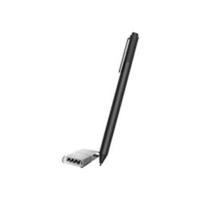
You can use the Surface Pen to draw and take notes in apps. Mark up PowerPoint presentations, Adobe PDF files, or Word documents just as you would on paper. Or get creative and draw something in Fresh Paint - a drawing app available in the Windows Store. The Surface Pen can also be used like a...

You can use the Surface Pen to draw and take notes in apps. Mark up PowerPoint presentations, Adobe PDF files, or Word documents just as you would on paper. Or get creative and draw something in Fresh Paint - a drawing app available in the Windows Store. The Surface Pen can also be used like a...
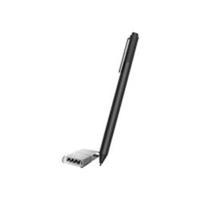
You can use the Surface Pen to draw and take notes in apps. Mark up PowerPoint presentations, Adobe PDF files, or Word documents just as you would on paper. Or get creative and draw something in Fresh Paint - a drawing app available in the Windows Store. The Surface Pen can also be used like a...

Take advantage of low power consumption, a low Total Cost of Ownership (TCO), fast print speeds and features designed for easy business integration with the new multifunction WorkForce Pro WF-M5690DWF. This business inkjet printer benefits from automatic double-sided printing, scanning, faxing and...

Take advantage of low power consumption, a low Total Cost of Ownership (TCO), fast print speeds and features designed for easy business integration with the new WorkForce Pro WF-M5190DW. This business inkjet printer benefits from automatic double-sided printing, making any job easy and efficient,...

The ASUS ProArt PA329Q 4K UHD professional monitor delivers accurate and brilliant color reproduction and is designed for graphics professionals. PA329Q is ideal for high-end video editing, thanks to a wide color gamut of 100% Rec. 709 and 99.5% Adobe RGB for exceptional color fidelity, and it has...

Preserve the true colors you captured and make sure the moments are perfect. BenQ SW2700PT photographer monitor with IPS technology and excellent 99% Adobe RGB color space, it gives you a wide color range and spectacular colors display. Keep the moment and never let it fade away.

For high quality output the i-SENSYS LBP7680Cx has 9600 x 600 dpi print resolution that\'s enhanced with automatic image refinement for a perfect finish on every print. The printer comes with large memory as standard, giving it the capacity to cope with large, complex documents and graphics, as...

Key Features 51ppm Mono Print 51ppm Colour Print 5 Seconds First page 100 Sheet Multi-Purpose Input Tray 525 Sheet Input Tray 2400 dpi Print Optional HDD 1GHz Processor 1GB (2GB Max) RAM USB & Network True Adobe PostScript 3, PCL 5c emulation, Direct PDF3, JPEG, TIFF and PNG Automatic Double Sided...

LED Monitor / Daisy-chain DisplayPort Output / USB Hub: 1 x upstream, 6 x downstream / USB 3.0 / USB port with SuperSpeed charging function / Card Reader: 9-in-1 up to 2TB capacity / SPLENDID Video Technology / Trace Free Technology / QuickFit Virtual Scale function / ASUS Smart Contrast Ratio...
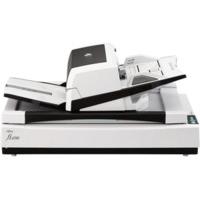
Document Scanner, A3 Scanner, Feeder Scanner / Scan-Technology: CCD / Scan Format: A3 / Supported Document Size: 297 x 420 mm / Scan Resolution: 600 dpi / Interface: USB 2.0 / Max. Scan Speed: 55 pages/min / Automatic Document Feed: 200 sheets / Document Feeder: Automatic / Colour Depth: 24 Bit /...
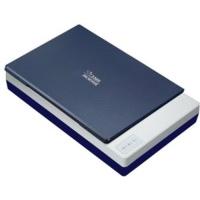
Document Scanner, Flat Bed Scanner, Book Scanner / Scan-Technology: CCD / Scan Format: A4 / Supported Document Size: 216 x 297 mm / Scan Resolution: 1, 200 dpi / Interface: USB 2.0 / Colour Depth: 48 Bit / Scan Documents: Documents, Books, Magazines / Light Source: LED / Controls: 3 Scan Buttons /...

Film Scanner, Slide Magazine Scanner / Scan-Technology: CCD / Scan Areas: 6x4, 5, 6x6, 6x7, 6x8, 6x9, 6x12 / Scan Resolution: 3, 200 dpi / Interface: USB 2.0 / Position of Connectivity Ports: 1x USB Rear / Colour Depth: 48 Bit / Light Source: White LED / Compatible Operating Systems: Windows 8,...

Slide Magazine Scanner / Scan-Technology: CCD / Supported Document Size: 37 x 37 mm / Scan Resolution: 5, 000 dpi / Interface: USB 2.0 / Position of Connectivity Ports: 1x USB Rear / Colour Depth: 48 Bit / Light Source: filmsaving LED / Functions: Auto Scan, Dust Removal, Scratch Removal, Magic...

The DJI Osmo is a handheld camera with built-in Zenmuse X3 gimbal head capable of delivering 4K stabilised video at 24, 25 or 30 frames per second and 12-megapixel stills in Adobe DNG RAW. Conveniently placed buttons keep important settings by your thumb for instant access, and the built-in phone...

The Datacolor SpyderCheckr allows photographers to colour calibrate their cameras, perform precision in-camera white balance and record known-colour samples. SpyderCheckr helps capture consistent colour from day to day and camera to camera and apply these results easily in your workflow with RAW...

Adobe ColdFusion Standard (2016 release) Use a single platform to rapidly build and deploy web and mobile applications. Leverage unique capabilities for end-to-end mobile application development. Generate high-quality PDFs, and make your server more secure with default server lockdown. License The...
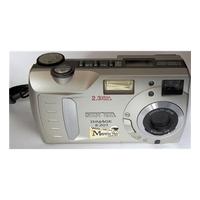
Digital Camera - DiMage E201 - Minolta 2.3 Mega Pixel camera with 2x zoom and movie function. Fully automatic controls. Complete with carrying pouch, cables, manual and software (inc Adobe PhotoDeluxe). Boxed (used)

Experience traditional Moroccan life and stunning scenery on a day trip from Marrakech to three famous valleys in the Atlas Mountains. Explore the lovely waterfalls in Ourika Valley, see traditional Berber villages made of adobe and stone in Oukaimeden Valley, and delight in the fruit orchards of...

Today you can walk back in time as you tour Mission San Luis Rey. Mission San Luis Rey is known as \"King of the Missions\" because of it\'s size, beauty, and productivity during the Mission era. Today the Mission is home to 28 Friars, a retreat center, cemetery, the Franciscan School of Theology,...

Visit two Chimú archeological sites and the coastal village of Huanchaco on this combo tour from Trujillo with a knowledgeable guide. Start at the Temple of the Dragon (also known as the Temple of the Rainbow), an adobe pyramid that features beautiful frieze murals. Then tour the biggest ancient...

3 Valley Day Excursion visiting Berber villages and park national Toubkal. Your guide speaks English, and he will take you on a 3-hour walk visiting also waterfalls, traditional Berber villages made of adobe and stone in Oukaimeden Valley, and make you marvel at the fruit orchards of Asni Valley....

Experience the charm of rural Mexico on a day trip to the colonial town of El Quelite. Enjoy a walk around the riverside village of red-roofed adobe houses and meet the hospitable local people on this relaxing day trip. The tour takes you to a traditional bakery, cheese factory and fish tank...

With a local guide, get an insider?s view of Liberia and visit some of the best shops in Guanacaste\'s capital city. On this half-day tour, you?ll be driven in a comfortable vehicle to ?the White City, ? known for its whitewashed adobe buildings and colonial charm. Browse for locally made goods and...

Experience traditional Moroccan life and stunning scenery on a day trip from Marrakech to four famous valleys in the Atlas Mountains. Discover the lovely waterfalls in Ourika Valley, explore traditional Berber villages made of adobe and stone in Oukaimeden Valley, and delight in the fruit...

Don\'t miss this early morning tour to El Tatio geyser field, one of San Pedro de Atacama?s most popular surrounding attractions and one of the biggest geothermal fields in the world with more than 80 geyers. With a local guide, you\'ll arrive at El Tatio at sunrise, when the cold, high-altitude...

Visit the World Heritage-listed archeological ruins of Tiwanaku, near the shores of Lake Titicaca, on this private half-day tour from La Paz. With a knowledgeable guide, tour the site?s adobe pyramids and temples, and learn about the fascinating history of the Tiwanaku civilization, which...

Immerse yourself in vibrant barrios, from old forts to modern art. Cycle quiet adobe-lined avenues to bustling university bike lanes. Experience the best of historic, quirky, and bike-friendly Tucson on a 3-hour guided bicycle tour. Ride 11 flat miles at a relaxed place, in a small group, with a...

Explore the sculptured mountain valley landscapes of the Quebrada de Humahuaca, a UNESCO World Heritage?listed gorge, on this full-day tour from Salta. Traveling the same route as the Incans once did, marvel at the serrated canyons and the ever-changing array of colors rippling down unusual rock...

On this half-day, small-group tour you will visit the most important landmarks of the city of Lima including ?Huaca Huallamarca, ? a pre-Inca adobe pyramid. You will also visit Larco Museum, try a delicious desert at Cafe del Museo, and visit historical downtown Lima, a UNESCO World Heritage site....

Enjoy this one day hike visiting the latest discovery in Cusco, and now famous Rainbow Mountains in Vinicunca town. Due to the rich minerals, the mountain is full of deep colors, that create a unique and amazing pattern. You will spend a day in the Andes and make your way by foot to this hidden...

Don\'t miss this early morning tour to El Tatio geyser field, one of San Pedro de Atacama?s most popular surrounding attractions and one of the biggest geothermal fields in the world with more than 80 geyers. With a local guide, you\'ll arrive at El Tatio at sunrise, when the cold, high-altitude...

Visit the World Heritage-listed archeological ruins of Tiwanaku, near the shores of Lake Titicaca, on this private half-day tour from La Paz. With a knowledgeable guide, tour the site?s adobe pyramids and temples, and learn about the fascinating history of the Tiwanaku civilization, which...

On this half-day, small-group tour you will visit the most important landmarks of the city of Lima including ?Huaca Huallamarca, ? a pre-Inca adobe pyramid. You will also visit Larco Museum, try a delicious desert at Cafe del Museo, and visit historical downtown Lima, a UNESCO World Heritage site....
 Mr Key Shop
 Keyzing
 Software Pal
 Unity Soft, The
 Wondershare
 Ayoa
 Softkeycart
 Nuance
 I Fax App
 Keycense
 Blitzhandel 24