Choose Which Site You Want To See



Adobe is a global software company known for creative, design, and document management tools used across many industries.
It offers a wide mix of applications that support tasks such as image editing, video production, illustration, and digital document workflows. The platform may suit individuals, teams, and organisations seeking established tools for visual work or document handling, though the broad feature set can involve a learning curve for newcomers.
Adobe is a well established software company recognised for developing creative, productivity, and digital document tools used by a broad range of individuals and organisations. Its products support activities such as photo editing, graphic design, illustration, video production, web development, marketing automation, and digital document management. The brand is closely associated with creative software, and its portfolio has expanded over time to include cloud based services and collaborative platforms. This positions Adobe as a long standing presence within the wider digital software market.
Founded in the early 1980s, Adobe evolved from producing foundational publishing technologies to offering an extensive suite of applications. The shift from standalone products to subscription based access through Adobe Creative Cloud introduced a more integrated ecosystem. This ecosystem approach means users can move between tools with consistent interfaces and shared libraries. The range extends beyond creative professionals, with solutions for students, small businesses, enterprises, hobbyists, and general consumers who need reliable digital documentation tools.
Within the broader market, Adobe operates in a premium segment. Its focus on capability depth, continuous updates, and cross platform integration shapes user expectations. People familiar with Adobe often expect robust features designed for detailed or high volume work. At the same time, the brand has introduced more beginner friendly tools designed for ease of use, indicating an interest in accessibility while maintaining its professional heritage.
For readers exploring an Adobe review, understanding the brand’s long standing reputation and the breadth of its offering can help contextualise how it compares with alternative software solutions. Adobe’s positioning combines creative heritage with cloud based innovation, presenting a structured environment for those who require digital content tools in the UK and beyond.
Browse the full range on the Adobe website.
The Creative Cloud suite includes professional and entry level applications designed for visual and audio work. These tools cover image editing, digital illustration, video production, motion graphics, interface design, and audio processing. The applications share consistent design principles and integrate with shared libraries and cloud storage.
Adobe’s document solutions focus on creating, editing, signing, and managing PDF files. These tools are used for personal organisation, academic work, and business documentation. They are known for compatibility with a wide range of platforms and for providing structured workflows for digital document handling.
Adobe offers several tools for photographers, ranging from detailed photo editing programs to cloud based organisers. These solutions support image enhancement, catalogue management, and multi device syncing. They suit beginners who want guided editing as well as professionals working with large collections.
This category includes software for editing, colour correction, sound design, and motion graphics. These tools are used across creative industries and by independent creators who require granular control over multimedia content. The applications support large file formats and include timeline based editing structures.
Adobe offers vector and layout tools intended for print design, branding, illustration, and publishing. These programs are often used by graphic designers who need precise control over shapes, typography, and page structure. They integrate with asset libraries and support a variety of export formats.
Some Adobe products focus on user experience design, prototyping, and digital interface planning. These tools allow users to create wireframes, interactive mock ups, and layouts. They provide collaborative features and aim to streamline digital product development.
Adobe provides marketing tools intended for organisations that manage digital campaigns and customer experiences. These services focus on analytics, automation, and content personalisation. They are suited to businesses seeking structured systems for digital engagement.
Adobe produces mobile versions of its creative and productivity tools. These apps support on the go editing, sketching, photography, and document handling. Mobile versions maintain familiarity with desktop counterparts while offering simplified interfaces.
The brand’s cloud storage and asset library systems help users organise files and access them across devices. These tools support collaborative work and cross application workflows. They are used for consistent branding, shared resources, and organised project management.
Adobe maintains a software based operating model that focuses on continuous development, integration between tools, and cloud supported features. The brand’s approach reflects an interest in providing structured, professional grade capabilities while also offering more accessible applications for broader audiences. Its values emphasise creativity, digital productivity, and cross platform flexibility.
In terms of positioning, Adobe operates within a premium segment of the market. Its tools are designed for users who want detailed functionality and consistency. The brand maintains a global presence and continues to enhance its cloud ecosystem. This creates a sense of continuity for users who shift between different types of digital work.
Interacting with Adobe typically involves navigating a unified account system that connects desktop, mobile, and cloud based tools. The interfaces across products share visual consistency, which can assist users who work within several applications. Information presented within the software tends to be structured and feature rich, providing options for both straightforward tasks and complex projects.
Usability varies between applications. Some tools offer guided modes or templates intended for beginners, while others provide advanced editing features.
Adobe is known for its creative and document based software tools. It develops applications used for design, editing, and digital document management. These tools span professional and general consumer needs and are widely recognised across several industries.
Adobe operates through a cloud based subscription model that provides access to its applications and services. The brand focuses on consistent updates, interoperability, and structured workflows. Users log into a unified system that links desktop and mobile tools with cloud storage.
A broad range of users work with Adobe products, including designers, students, hobbyists, businesses, and content creators. People often choose Adobe when they need structured creative tools or reliable document handling solutions.
Adobe can be suitable for beginners, especially with applications that offer guided editing or simplified interfaces. Some tools are more advanced and may involve a learning period. Suitability depends on a user’s comfort level with creative software and their overall goals.
Adobe sits within the premium tier of creative and document tools, offering extensive features and an integrated ecosystem.
Users benefit from knowing that Adobe focuses on cloud integration and regular updates across its tools. Some applications are designed for detailed work and can involve learning time. Exploring the ecosystem can help users understand which tools align with their needs.
Adobe continues to play a significant role in digital creativity and documentation. Its software suite covers design, photography, illustration, video editing, audio production, and PDF management. The brand’s premium positioning reflects its emphasis on capability depth, integration, and cross platform consistency. Users often choose Adobe when they need tools that support detailed projects or structured workflows, although many applications also include features intended to help beginners navigate creative tasks.
In the UK and internationally, Adobe’s long standing history contributes to its ongoing presence in professional and educational environments. The cloud based model allows for regular updates and collaborative features. Suitability depends on the user’s goals, level of experience, and interest in exploring an interconnected ecosystem.
This overview highlights what readers can expect from the brand and how Adobe fits within the wider software landscape. It offers a balanced perspective for those examining the brand in relation to their own creative or organisational needs.
Ready to shop? See the full range on the Adobe website.
This guide was written by AI. It does not represent the views or opinions of the website owner.
Updated October 2026
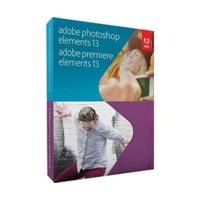
Adobe Photoshop Elements 13 & Adobe Premiere Elements 13 (en) (win/mac) (box): Graphic Tools / Series: Adobe Photoshop Elements / Platforms: Mac, Windows / Version: Full Version / Language: English / Package Contents: Adobe Photoshop Elements, Adobe Premiere Elements / Special Feature: Slideshow Creation / Number of User Licenses: 1 / Licence Type: Single User / minimale Betriebssysteme: Apple MacOS X 10.8, Microsoft Windows 7, Microsoft Windows 8 / minimale Prozessoren: Intel-Mac compatible, Pentium 64-bit compatible, Pentium 32-Bit compatible / minimaler Prozessortakt:...

Adobe Photoshop & Premiere Elements 14 (en) (box): Graphic Software / Series: Adobe Photoshop Elements, Adobe Premiere Elements / Platforms: Windows, Mac / Version: Full Version / Language: English / Distribution Form: Box / Package Contents: Adobe Premiere Elements, Adobe Photoshop Elements / Applications: Repair Tools, Repair Work, Multimedia and Interactive File Creation, Mask Editing, Graphic and Drawing Creation, Image Managing / Number of User Licenses: 1 / Licence Type: Single User / minimale Betriebssysteme: Apple MacOS X 10.10, Apple...

Adobe Photoshop Elements 15 & Premiere Elements 15 (en) (box) (edu): Graphic Software / Series: Adobe Photoshop Elements, Adobe Premiere Elements / Platforms: Windows, Mac / Versions: Full Version, Student version / Language: English / Suitable for: Professionals / Distribution Form: Box / Package Contents: Adobe Premiere Elements, Adobe Photoshop Elements / Applications: Repair Tools, Repair Work, Multimedia and Interactive File Creation, Mask Editing, Graphic and Drawing Creation, Image Managing / Number of User Licenses: 1 / Licence Type: Single User /...

Adobe Photoshop Elements 15 & Premiere Elements 15 (de) (box): Graphic Software / Series: Adobe Photoshop Elements, Adobe Premiere Elements / Platforms: Mac, Windows / Version: Full Version / Language: German / Suitable for: Professionals / Distribution Form: Box / Package Contents: Adobe Premiere Elements, Adobe Photoshop Elements / Applications: Repair Tools, Repair Work, Multimedia and Interactive File Creation, Mask Editing, Graphic and Drawing Creation, Image Managing / minimale Betriebssysteme: Apple MacOS X 10.10, Apple MacOS X 10.9, Microsoft...
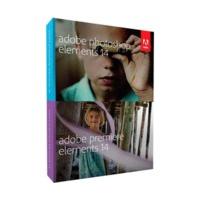
Adobe Photoshop & Premiere Elements 14 (edu) (en) (box): Graphic Software / Series: Adobe Photoshop Elements, Adobe Premiere Elements / Platforms: Windows, Mac / Versions: Full Version, Student version / Language: English / Distribution Form: Box / Package Contents: Adobe Premiere Elements, Adobe Photoshop Elements / Applications: Repair Tools, Repair Work, Multimedia and Interactive File Creation, Mask Editing, Graphic and Drawing Creation, Image Managing / Number of User Licenses: 1 / Licence Type: Single User / minimale Betriebssysteme: Apple...

Adobe Director ( V. 12 ) - Licence - 1 User - Consignment, Indirect- Electronic Download: Adobe Director 12 and Adobe Shockwave Player software help you create and publish compelling interactive games and eLearning courses for the web, iOS devices, Mac and Windows desktops, DVDs, and CDs. Integrate virtually any major file format, including FLV, swf and native 3D content. Publish to iOS devices workflow Adobe Director 12 can now publish games directly to iOS devices, through a simple, yet powerful workflow. Existing games can be republished to run on the iOS platform. Enhance the gaming...

Adobe Photoshop Elements 14 Plus Adobe Premiere Elements 14 Student And Teacher Edition - Electronic Software Download: **Adobe require proof of eligibility before issuing the serial number after purchase. Adobe Photoshop software, the professional image-editing standard, helps you work more efficiently, explore new creative options, and produce the highest quality images for print, the Web, and anything else.

Adobe Photoshop Elements 15 Plus Adobe Premiere Elements 15: Bring your photo and video collection to life in vibrant home movies and photo creations you\'ll enjoy for years to come. Adobe Photoshop Elements plus Adobe Premiere Elements software makes it easy to edit and create using automated options, share photos and movies with your social network, and easily find and view all your media.
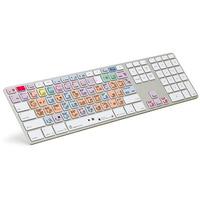
Logickeyboard Adobe Lightroom 5 Mac Advance Keyboard: This full size ultra-thin aluminium Apple Logickeyboard with two USB 2.0 ports is compatible with the Adobe Lightroom 5 software and designed to boost productivity. The keyboard contains a variety of shortcuts that are colour coded in 8 distinctive keycap colours. The keyboard offers a great way to learn Adobe Lightroom 5 and its key commands.
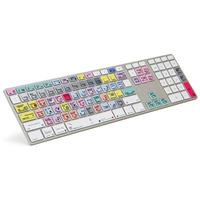
Logickeyboard Adobe Photoshop Cc Mac Advance Keyboard: LogicKeyboard shortcut keyboard for Adobe Photoshop CC has its base on the original Apple ultra-thin aluminium keyboard. It offers plug-and-play setup with any current or recent USB-equipped Apple Macintosh computer, has a good feel and stylish modern appearance. The shortcut keyboard for Adobe Photoshop CC makes controlling the Photoshop with the keyboard instead of the mouse a lot simpler and faster. It is ideal for creative media production facilities, professionals and anyone else who...

Canon I-sensys Lbp252dw A4 Mono Laser Printer With Adobe Postscript Support: This compact and reliable A4 B&W laser printer boasts Adobe PostScript support for fast, high-quality results, plus a great choice of cloud and connectivity options for today’s mobile devices. Key Features Compact, reliable A4 B&W laser printer for small workgroups and businesses Rapid, high quality 33 ppm printing helps keep your teams productive Ideal for frequent print tasks like forms, invoices, receipts and delivery notes Adobe PostScript support for easy network int

Adobe Contribute ( V. 6.5 )- Win- Electronic Software Download: Adobe® Contribute® 6.5 software is a powerful web publishing and website management tool that integrates authoring, reviewing, and publishing in an easy-to-use WYSIWYG HTML editor. Increase web publishing productivity while simplifying oversight and approval tasks. Contribute 6.5 also includes support for HTML5 and JQuery mobile. Integrate authoring, reviewing, and publishing into a collaborative workflow with Adobe® Contribute® 6.5 software. Increase web publishing...

Adobe Elearning Suite ( V. 6.1 )- Mac- Electronic Download: Adobe® eLearning Suite 6.1 software is an integrated toolbox for creating eLearning and HTML5-based mLearning content. Get the best tools for application simulation, product demos, digital imaging, rich animations, and audio production. Accelerate development with rapid prototyping, roundtripping workflows, and out-of-the-box assets like actors and smart interactions. Publish to SCORM- and AICC-compliant LMSs and easily track SWF, PDF, and HTML5 content. Take advantage of world-class...

Adobe Photoshop Elements 14 Plus Adobe Premiere Elements 14 - Electronic Software Download: Get everything you need for videos Use Adobe Premiere Elements software for all your video needs. Import and easily find and organize clips. Edit them yourself or use automated options. Share your clips and movies on virtually any screen. Easily do more with video clips and photos Make all your memories shine whether they\'re captured on video or in photos. For example, enhance color in video clips as easily as you do in photos, and quickly bring photos to life using customized pan and zoom...

Adobe Hacienda Motel: Location. Located in Hollywood (South Fort Lauderdale), Adobe Hacienda Motel is close to Hollywood Beach Golf Resort, The ArtsPark at Young Circle, and Art and Culture Center of Hollywood. Also nearby are Sheridan Square Shopping Center and West Lake Park. Property Features. Wireless Internet access is complimentary in public areas. The property has designated areas for smoking. Guestrooms. The 15 air-conditioned guestrooms at Adobe Hacienda Motel include safes. Guests can use the in-room...

Magnuson Hotel Adobe Inn: Location. Situated in Holbrook, Magnuson Hotel Adobe Inn is close to Navajo County Historical Society Museum, Hidden Cove Golf Course, and Northland Pioneer College. Also nearby is Navajo County Government Complex. Property Features. Magnuson Hotel Adobe Inn has an outdoor pool and a fitness center. There is a business center on site. The motel offers a bar/lounge. Additional amenities include multilingual staff and coffee/tea in the lobby. Self parking is complimentary. This is a smoke-free...

Adobe Inn At Cascade: Location. Situated in Cascade, Adobe Inn at Cascade is in the mountains and area attractions include Cave of the Winds, Manitou Springs Cave Dwellings, and Garden of the Gods. Additional area attractions include Pikes Peak and Manitou Incline. Property Features. Complimentary wireless Internet access is available in public areas. Self parking is complimentary. Guestrooms. The 3 guestrooms at Adobe Inn at Cascade include fireplaces and coffee/tea makers. Guests can use the in-room...

Beautiful Me Mineral Eyeshadows Adobe Brick - 2Â g: Shimmery bronze-brown mineral eyeshadow 100% natural, highly pigmented mineral formula Oil free, cruelty free and BUAV approved Beautiful Me Mineral Eyeshadows Adobe Brick is from the \'Burning Spirit Collection\'; a shimmery bronze, brown mineral eyeshadow that\'s fabulous for all eye colours. Try mixing Adobe Brick with a little water for a dramatic colour hit. Or, for a youthful wide-eyed look, apply Marble Sparkle eyeshadow to the inner corner of the eye, where you naturally have a dark shadow.

Accredited Adobe In-design Course: Create industry leading publications with the Accredited Adobe In-Design Course\r Feel comfortable with all the tools and unleash your creativity\r Give your CV a boost when you add an Indesign Accreditation to it\r 30 hours of study\r Learn from anywhere with an internet connection \r No experience necessary\r 24/7 help centre for students\r Access to a virtual campus account\r Save 80% with the Accredited Adobe In-Design Course for 19 pound instead of 99 pound

Adobe Lightroom For Beginners Online Course: Make the most of your photos with Adobe Lightroom for Beginners\r Ideal for amateur photographers or those looking for a career in photography or editing\r Learn how to alter colours, improve vibrancy, straighten shots and more\r See Full Details for course syllabus\r Course takes approximately 30 hours to complete\r Online learning allows you to study in your own time and pace\r Save 80% on the Adobe Lightroom for Beginners Course for 19 pound instead of 99 pound
 Mr Key Shop
 Keyzing
 Software Pal
 Unity Soft, The
 Wondershare
 Ayoa
 Softkeycart
 Nuance
 I Fax App
 Keycense
 Blitzhandel 24